Monday, February 14, 2022

ADOP Error: UNEXPECTED]You must run adop from the primary node

 Issue

Recently, EBS Dev instance has been cloned from production. Clone got completed successfully and application is running fine. This is multi node clone with DEV having 2 application tiers. But fs_clone command failed with below errors.


[applmgr@ebsdevapp01 ~]$ adop phase=fs_clone

ERROR: This env should be sourced from ebsdevapp01 !


Enter the APPS password:

Enter the SYSTEM password:

Enter the WLSADMIN password:


Validating credentials.


Initializing.

Run Edition context : /appsr12/R122/fs2/inst/apps/EBSDEV_ebsdevapp01/appl/admin/EBSDEV_ebsdevapp01.xml

Patch edition context: /appsr12/R122/fs1/inst/apps/EBSDEV_ebsdevapp01/appl/admin/EBSDEV_ebsdevapp01.xml

Patch file system free space: 226.11 GB


Validating system setup.

Node registry is valid.

[UNEXPECTED]You must run adop from the primary node -> ebsdevapp02


Cause & Fix

As part of  cloning, addnode command is executed on primary node instead of actual target server that needs to be added. 


Due to this, the addnode.pl has updated the /u01/ebsdev/fs1/FMW_Home/Oracle_EBS-app1/applications/oacore/APP-INF/node_info.txt for primary node with information pointing to secondary node as below.


ebsdevapp01:CONTEXTFILE=/appsr12/R122/fs1/inst/apps/EBSDEV_ebsdevapp02/appl/admin/EBSDEV_ebsdevapp02.xml

ebsdevapp01:INSTANCETOP=/appsr12/R122/fs1/inst/apps/EBSDEV_ebsdevapp02

ebsdevapp01:ORACLEHOME=/appsr12/R122/fs1/EBSapps/10.1.2

ebsdevapp01:FNDSECURE=/appsr12/R122/fs1/inst/apps/EBSDEV_ebsdevapp02/appl/fnd/12.0.0/secure

ebsdevapp01:DBCFILENAME=EBSDEV.dbc

ebsdevapp01:TNSADMIN=/appsr12/R122/fs1/inst/apps/EBSDEV_ebsdevapp02/ora/10.1.2/network/admin


Inorder to fix the issue, we need to manually edit the file node_file.txt to point to correct values

Friday, January 7, 2022

ORA-12547: TNS:lost contact

Issue:

We are doing database upgrade and suddenly when we try to connect to database as sysdba, started seeing ora-12547 error as below:


[oracle@oradb1 19.3.0]$ sqlplus / as sysdba
 
SQL*Plus: Release 19.0.0.0.0 - Production on Fri Jan 7 09:59:41 2022
Version 19.13.0.0.0
 
Copyright (c) 1982, 2021, Oracle. All rights reserved.
ERROR:

ORA-12547: TNS:lost contact


We verified database processes and running fine but still unable to connect to database. Tried connecting as sys or system user and still having same issue.

We are able to connect to database via listener successfully.

Cause:

spfile has been corrupted as it has been accidentally edited by some one. Got below error when tried creating pfile from spfile.

SQL> create pfile from spfile;

create pfile from spfile*

ERROR at line 1:

ORA-01565: error in identifying file '?=/dbs/spfile@.ora'

ORA-27046: file size is not a multiple of logical block size

Additional information: 1


Fix:

Upon further investigation, We identified that spfile has been accidentally edited by someone making the file corrupt.

Performed action plan as below:
1) Connect to database as sys user with TNS
2) shut down  database (if required,  get parameter detaisl from database before shutdown)
3) create pfile/spfile manually from backup
4) Startup database


Wednesday, December 16, 2020

OCI: How to resize Root Disk in OCI for Linux


In general, when you provision a Linux Compute the default size of boot disk will be 47 GB and sometimes this may not sufficient when the server usage keeps increasing. Even though while creating a Compute you have a flexibility of sizing the boot disk, we often miss to set or you may not be sure the initial sizing requirements.

This post will detail the steps on how to resize the root disk in Linux. Good news is that Oracle has provided a simple utility to resize root disk (/) in a simple and safer way.

As part resize first step is to resize Boot Volume in OCI.

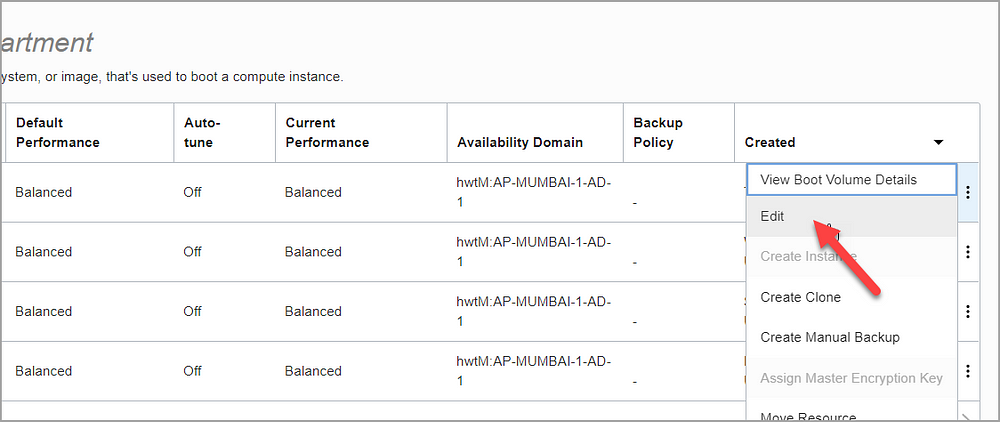
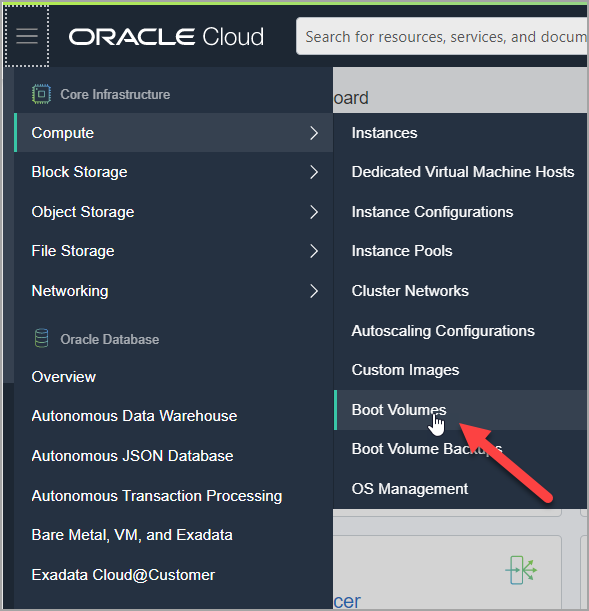
Login to OCI, Open the navigation menu. Under Core Infrastructure, go to Compute and click Boot Volumes.

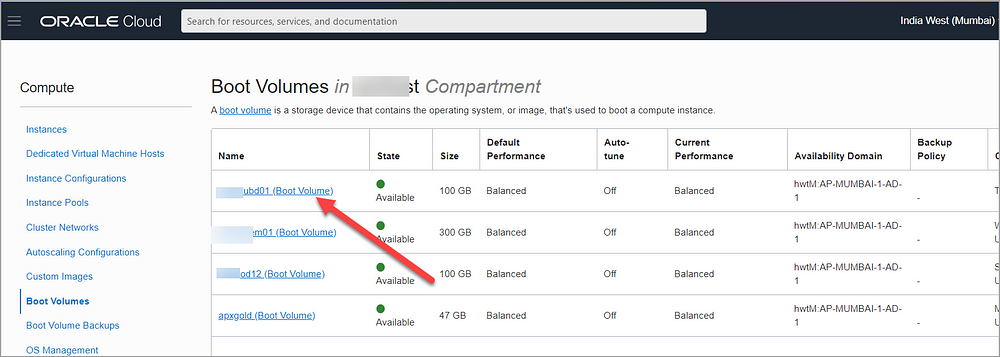
In the Boot Volumes list, click the boot volume you want to resize.

Then choose three dots and click Edit

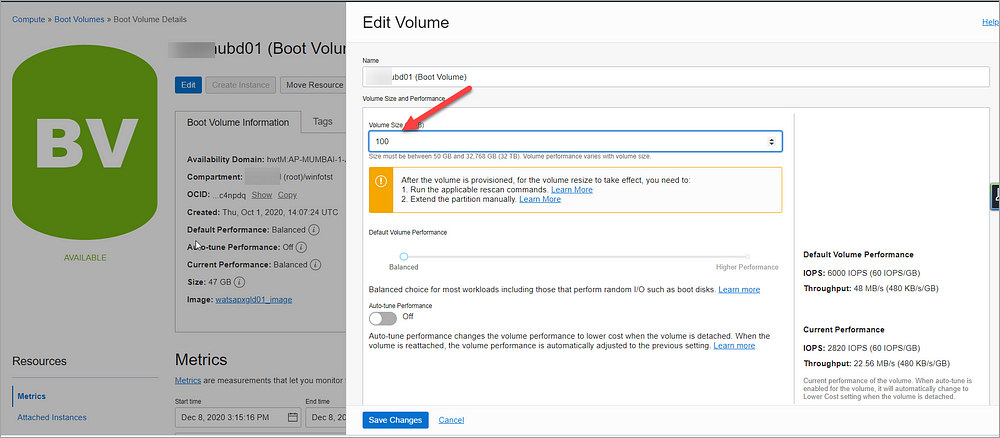
Specify the new size in VOLUME SIZE (IN GB). You must specify a larger value than the boot volume’s current size (for e.g. 100GB)

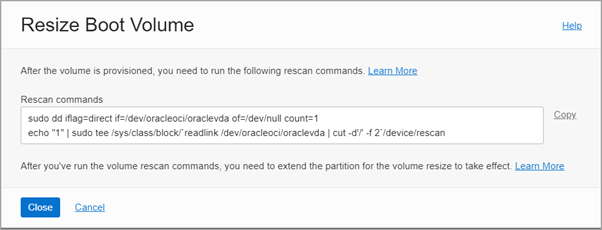
Click Save Changes. This opens a dialog that lists the commands to rescan the disk that you need to run after the volume is provisioned.

You need to run these commands so that the operating system identifies the expanded volume size.

Now the resize of boot volume is completed successfully in OCI. We need to now proceed with steps to be performed Linux box.

Login to Linux VM as root user and run the OCI commands from above step.

# sudo dd iflag=direct if=/dev/oracleoci/oraclevda of=/dev/null count=1
# echo “1” | sudo tee /sys/class/block/`readlink /dev/oracleoci/oraclevda | cut -d’/’ -f 2`/device/rescan
Now the next step is to run the OCI utility oci-growfs command which will resize the / disk.

oci-growfs is available as part of oci-utils rpm for Oracle Linux 7& 8. If the compute is installed from OCI standard image this will be available by default. If the image custom, we need to install oci-utils rpm manually.

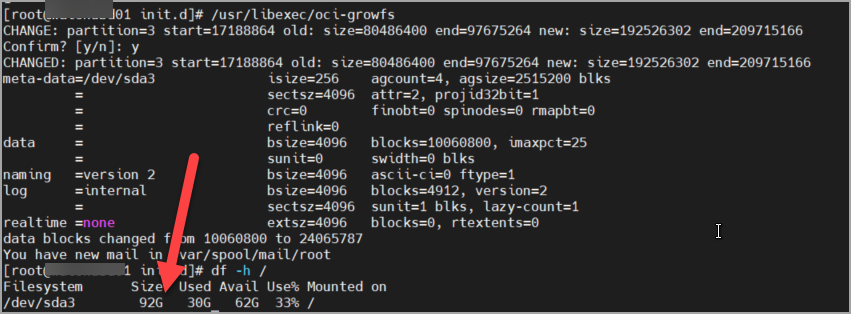
Extend the partition and grow the file system using the oci-growfs as below

# /usr/libexec/oci-growfs

Yoo! Boot disk resize is completed successfully.

Note: This action plan tested and works for Oracle Linux 7.

Useful LDAP Commands

 Below are the frequently used ldap commands that will be handful for DBA who is supporting OID.


OID Default LDAP port - 3060

AD Default LDAP port - 389

Query Attrributes for User from AD

ldapsearch -h <AD LDAP Server> -p <LDAP Port> -D "<LDAP User>" -w "<Password>" -W  "dc=domain,dc=com" "sAMAccountName=<Namee>"

Query Attrributes for User from OID

ldapsearch -h <OID LDAP Server> -p <LDAP Port> -D "<LDAP User>" -w "<Password>" -W  "dc=domain,dc=com" "uid=<Namee>"

LDAP Query to list groups assigned to User in OID

$ORACLE_HOME/bin/ldapsearch -h <OID/LDAP Server> -p <LDAP Port> -D "cn=orcladmin" -w "<password>" -b  "dc=domain,dc=com" -s sub "(uniquemember=cn=muthadi\, venkat,cn=users,dc=domain,dc=com)" dn


ADD GROUP TO USER FROM BACKEND in OID
Create LDIF file with attributes as below:
test.ldif
dn: cn=Administrator,cn=groups,dc=domain,dc=com
changetype: modify
add: uniquemember 
uniquemember : cn=muthadi\, venkat,cn=users,dc=domain,dc=com

Then Run below command
ldapmodify  -h <OID/LDAP Server> -p <LDAP Port> -D "cn=orcladmin" -w <password> -v -f test.ldif  

List All Groups in OID
./ldapsearch -x -h <OID/LDAP Server> -p <LDAP Port> -D cn=orcladmin -w <password> -L -b "cn=groups,dc=domain,dc=com" -s one "objectclass=*" dn


I use these regularly in my day to day activities, please feel free to correct or add any things that will be useful for others.


Thursday, July 6, 2017

/OA_HTML/AppsLocalLogin.jsp was not found in EBS 12.2


Issue:


Recently we performed clone of EBS 12.2 and post clone when we tried to launch our DMZ application we started seeing below error.

Not Found

The requested URL /OA_HTML/AppsLocalLogin.jsp was not found.

The primary node works without error. The issue is only with DMZ/Secondary node which has been added as part of the clone.

Fixes tried:
Tried to run "Generate Producte JAR Files" with force options.

Ran oJsp compilation as below

$ perl ojspCompile.pl --compile --flush -p 10 -log /tmp/ojspc_error.log

None of these helped.

Fix

Then later I realized that OA_HTML in EBS 12.2 is linked to oacore_server managed server via interface file mod_wl_ohs.conf.  Apache uses this file to identify where the application is residing at then get the information.

With this information, I verified the file mod_wl_ohs.conf in /config/OHS/ and noticed that it has entries as below

$ cat /u01/EBSDB/fs1/FMW_Home/webtier/instances/EBS_web_EBSDB_OHS2/config/OHS/EBS_web_EBSD/mod_wl_ohs.conf
LoadModule weblogic_module   "${ORACLE_HOME}/ohs/modules/mod_wl_ohs.so"
        DynamicServerList OFF
        
                SetHandler weblogic-handler
                WLCookieName JsessionIDEkanban
                WebLogicCluster ebsapp.local:6847
                WLTempDir ${ORACLE_INSTANCE}/tmp
       
       
                SetHandler weblogic-handler
                WebLogicCluster ebsapp.local:6847
                WLTempDir ${ORACLE_INSTANCE}/tmp
       
       
                SetHandler weblogic-handler
                WLCookieName JsessionIDYMS
                WebLogicCluster ebsapp.local:6847
                WLTempDir ${ORACLE_INSTANCE}/tmp
       

This file is missing key entries for OA_HTML. forms, etc., and thus apache is unable to redirect to actual EBS Login page. 

With this details, I added the information that is missing as below and then bounced apache services.

LoadModule weblogic_module   "${ORACLE_HOME}/ohs/modules/mod_wl_ohs.so"
        DynamicServerList OFF
        OA_HTML
>
                SetHandler weblogic-handler
                WebLogicCluster ebsapp.local:7247
                WLTempDir ${ORACLE_INSTANCE}/tmp
       
        forms
>
                SetHandler weblogic-handler
                WLCookieName JsessionIDForms
                WebLogicCluster ebsapp.local::7447
                WLTempDir ${ORACLE_INSTANCE}/tmp
       
        webservices
>
                SetHandler weblogic-handler
                WLCookieName JsessionIDOAFM
                WebLogicCluster hpebsdev20.hpinc.com:7647
                WLTempDir ${ORACLE_INSTANCE}/tmp
       
        formsclient
>
                SetHandler weblogic-handler
                WLCookieName JsessionIDFORMS-C4WS
                WebLogicCluster ebsapp.local::7847
                WLTempDir ${ORACLE_INSTANCE}/tmp
       
       
                SetHandler weblogic-handler
                WLCookieName JsessionIDEkanban
                WebLogicCluster hpebsdev20.hpinc.com:6847
                WLTempDir ${ORACLE_INSTANCE}/tmp
       
       
                SetHandler weblogic-handler
                WebLogicCluster ebsapp.local:6847
                WLTempDir ${ORACLE_INSTANCE}/tmp
       
       
                SetHandler weblogic-handler
                WLCookieName JsessionIDYMS
                WebLogicCluster ebsapp.local:6847
                WLTempDir ${ORACLE_INSTANCE}/tmp
       

Thank you.

Friday, June 2, 2017

Session Timeout for OAF Pages in EBS 12.2

Follow the below procedure to change the session timeout for EBS 12.2 OAF(Web HTML) Pages and set in sync with profile "ICX: Session Timeout"

Login to EBS Application Server. Navigate to ${EBS_ORACLE_HOME}/deployment_plansdirectory and modify the timeout values for all below plan.xml files

./oafm/plan.xml
./forms/plan.xml
./oacore/plan.xml

Change the value for variable "WeblogicApplication_SessionDescriptor_TimeoutSecs" from default 1800 to required value (e.g. 14400(4hrs))
WeblogicApplication_SessionDescriptor_TimeoutSecs
1800
To
WeblogicApplication_SessionDescriptor_TimeoutSecs
14400

Perform these steps for all the plan.xml files listed above.
Once the changes are made bounce all the below services to reflect the changes.
1.       Apache, oafm, oacore, forms.
Once bounce is completed, verify the timeout by navigating to application deployment screen as below:
Login to WebLogic Console à Deployments Ã  expand oacore(1.0.0) application à Click on /OA_HTML
Navigate to Configuration tab and verify timeout value for field "Session Timeout"

Wednesday, February 3, 2016

adfgclone.pl in 12.2 failed while ohsT2PApply process


adcfgclone.pl failed while performing clone of EBS 12.2 instance. This occurred while ohsT2PApply is in progress.

Below are the errors found in logfiles.

/tmp/CLONINGCLIENT-1008723463327980977/clone_asinstance_start_process-1337948214.log
2015-12-02T3:10:04-06:00] [opmn] [ERROR:1] [] [internal] lxlinit - NLS boot file not found or invalid
opmnctl ping: error parsing /d12/tech_st/fs1/FMW_Home/webtier/instances/EBS_web_EBDV2_OHS1/config/OPMN/opmn/opmn.xml
[2015-12-02T3:10:04-06:00] [opmn] [ERROR:1] [105] [internal] XML parser init: character set initialization failed.
$INST_TOP/admin/log/clone/run/ohsT2PApply/CLONE2016-02-02_13-10-02_599255196.error:
 
2015-12-02T3:10:04-06:00] [opmn] [ERROR:1] [] [internal]...
2015-12-02T13:10:04-06:00] [opmn] [ERROR:1] [] [internal] lxlinit - NLS boot file not found or invalid
opmnctl ping: error parsing /d12/tech_st/fs1/FMW_Home/webtier/instances/EBS_web_EBDV2_OHS1/config/OPMN/opmn/opmn.xml
[2015-12-02T3:10:04-06:00] [opmn] [ERROR:1] [105] [internal] XML parser init: character set initialization failed.
SEVERE : Dec 2, 2016 03:10:04 - ERROR - CLONE-20218   Cloning is not successful.
SEVERE : Dec 2, 2016 03:10:04 - CAUSE - CLONE-20218   An internal operation failed.
SEVERE : Dec 2, 2016 03:10:04 - ACTION - CLONE-20218   Provide the clone log and error file for investigation.
oracle.as.clone.cloner.exception.ApplyCloneException:  Instance "Create & Start" step  failed.
        at oracle.as.clone.util.ASInstanceUtil.createStartAndregisterASInstance(ASInstanceUtil.java:333)
        at oracle.as.clone.util.ASInstanceUtil.createStartInstance(ASInstanceUtil.java:282)
        at oracle.as.clone.cloner.component.ComponentApplyCloner.createStartInstance(ComponentApplyCloner.java:272)
        at oracle.as.clone.cloner.component.ComponentApplyCloner.doClone(ComponentApplyCloner.java:134)
        at oracle.as.clone.cloner.Cloner.doFinalClone(Cloner.java:63)
        at oracle.as.clone.request.ApplyCloneRequest.applyArchive(ApplyCloneRequest.java:188)
        at oracle.as.clone.request.ApplyCloneRequest._clone(ApplyCloneRequest.java:69)
        at oracle.as.clone.process.CloningExecutionProcess.execute(CloningExecutionProcess.java:131)
        at oracle.as.clone.process.CloningExecutionProcess.execute(CloningExecutionProcess.java:114)
        at oracle.as.clone.client.CloningClient.executeT2PCommand(CloningClient.java:257)
        at oracle.as.clone.client.CloningClient.main(CloningClient.java:119)
Caused by: java.lang.Exception: Unable to start opmnserver of the instance /u01/app/EBSDEV2/tech_st/fs1/FMW_Home/webtier/instances/EBS_web_EBSDEV2_OHS1
        at oracle.as.clone.provisioning.implementations.ASInstanceProvImpl.startInstance(ASInstanceProvImpl.java:449)
        at oracle.as.clone.provisioning.implementations.ASInstanceProvImpl.createInstanceAndStart(ASInstanceProvImpl.java:198)
        at oracle.as.clone.util.ASInstanceUtil.createStartAndregisterASInstance(ASInstanceUtil.java:327)
        ... 10 more
SEVERE :  Instance "Create & Start" step  failed.


Solution:

 Unset the following environment
ORA_NLS10
TNS_ADMIN
ORACLE_HOME

Also, before running adcfgclone.pl make sure no EBS related environment is configured.

Friday, November 27, 2015

adop fs_clone/prepare fails with [UNEXPECTED]Invalid worker Count: 0


We recently added a node to our current EBS application. As part of the node addition steps, tried to executed adop phase=fs_clone but it failed immediately with errors.


Enter the APPS password:
Enter the SYSTEM password:
Enter the WLSADMIN password:
Validating credentials.
Initializing.
    Run Edition context  : /app/EBD//fs2/inst/apps/EBD_oraapp01/appl/admin/EBD_oraapp01.xml
    Patch edition context: /app/EBD//fs1/inst/apps/EBD_oraapp01/appl/admin/EBD_oraapp01.xml
    Patch file system free space: 41.85 GB
Validating system setup.
    [UNEXPECTED]Invalid worker Count: 0
    [UNEXPECTED]Error validating worker count


Later tried to assign worker count of value 8 manually as below but it also failed
  $ adop phase=fs_clone workers=8
 
Validating credentials.
Initializing.
    Run Edition context  : /app/EBD//fs2/inst/apps/EBD_oraapp01/appl/admin/EBD_oraapp01.xml
    Patch edition context: /app/EBD//fs1/inst/apps/EBD_oraapp01/appl/admin/EBD_oraapp01.xml
    Patch file system free space: 41.85 GB
    [UNEXPECTED]Specified value 8 is not supported by the database.
    [UNEXPECTED]A maximum of 1 workers can be invoked.
    [UNEXPECTED]Error validating worker count


Observed the same issue with prepare phase as well.

Solution:
The default worker count information(recomm & max)  is stored in a file adpawc.xml that can be found under $APPL_TOP/admin/$TWO_TASK/log

Somehow this file has been modified with recommended value as 0 and max value as 1 during node addition.

FileContent:
<?xml version="1.0"?>
<WORKER_COUNT>
        <RECOMMENDED>0</RECOMMENDED>
        <MAX>1</MAX>
</WORKER_COUNT>

Update recommended &  max value based on cpu count.

Here I updated recommended value as 8 and max value as 64 and saved the file.

Once the changes are made, fs_clone went smoothly.

Saturday, November 7, 2015

adop fs_clone failed after cutover port issue

Issue:

FS_CLONE failed during vallidation and below are errors in Validation logfiles
Started execution   : ADOPValidations.java
Node Name                       File Edition                    Port Name                       Port Value
----------------------------------------------------------------------------------------------------------------------------
ebs001                      run                     s_java_object_cache_port                        12366
ebs002                      run                     s_java_object_cache_port                        12367
ebs001                      patch                   s_java_object_cache_port                        12366
ebs002                      patch                   s_java_object_cache_port                        12367


ERROR:
The following ports are out of sync on RUN Edition-> [s_java_object_cache_port]
Corrective Action: update the context files so that all the erroneous ports have same value across all nodes
and run AutoConfig to sync with the value in the database.

The following ports are out of sync on PATCH Edition-> [s_java_object_cache_port]
Corrective Action: update the context files so that all the erroneous ports have same value across all nodes
and  run AutoConfig with the -syncctx option to sync with the value in the database.


Fix:
There is a port mismatch for variable s_java_object_cache_port. Based on port pool, values should be as below:
Node Name                       File Edition                    Port Name                       Port Value
----------------------------------------------------------------------------------------------------------------------------
ebs001                      run                     s_java_object_cache_port                        12367
ebs002                      run                     s_java_object_cache_port                      12367
ebs001                      patch                   s_java_object_cache_port                       12366
ebs002                      patch                   s_java_object_cache_port                    12366


1) On ebs001 update run context file with correct port value 12367 & run autoconfig.sh
2) On ebs002 update patch contextfile and and adconfig with syncctc option as below
$ sh $AD_TOP/bin/adconfig.sh contextfile=$CONTEXT_FILE -syncctx

Saturday, October 10, 2015

adop fs_clone fails with error - The following nodes are not in sync

Issue:
EBS Application is multi node setup and a patch has been applied by DBA from Primary node using adop with hotpatch option. The patch is successful in one node and failed on other node. This is not observed by the DBA and he proceeded with other patch as well and that has also failed on second node.

DBA identified the issue on secondary node and fixed the issue with second node.

DBA fixed issue on Node2 and tried to apply patch on Slave node with allnodes=no

adop phase=apply patches=20012197 workers=8 hotpatch=yes allnodes=no action=nodb

adop returned successfully updated that Patch is successfull.

Now we need to sync the filesystems and tried to fs_clone on all nodes as below.

$ adop phase=fs_clone

Unfortunately fs_clone has failed with below errors..
Checking for pending adop sessions...
    No pending session exists.
    Staging new adop session...
    [UNEXPECTED]The following nodes are not in sync : oraapp02    Please bring the nodes in sync and then continue    [UNEXPECTED]Unrecoverable error occured. Exiting the current session.


DBA Tried to run prepare/cleanup and none of them helped.. all these got failed.

Solution:

Even though patch has been applied on failed nodes and it showed as successfull. ADOP activity didn't updated patchrun_id in table AD_ADOP_SESSION_PATCHES.
Below is the output seen:
select bug_number, patchrun_id, node_name from  AD_ADOP_SESSION_PATCHES where bug_number in ('20126243')
BUG_NUMBER                     PATCHRUN_ID            NODE_NAME                      
------------------------------ ---------------------- -------------------------------
20126243                       24398                  oraapp01                     
20126243                       -1                  oraapp02                     
   
Based on output patchrun_id for oraapp02 should be 24398 instead it is showing as "-1".

Before are two solutions to fix this issue:

Sol 1: 
If Patch that is applied is a small oneoff patch try applying patch on all nodes with force option & nodbportion as below

$ adop phase=apply  patches=20126243 workers=8 hotpatch=yes options=forceapply,nodatabaseportion

This step will update patchrun_id in table AD_ADOP_SESSION_PATCHES

Sol 2: 
Manually update patchrun_id for node 2 as value same as that of node1
SQL> update table AD_ADOP_SESSION_PATCHES set patchrun_id=24398 where bug_number='<bug_number>' and session_id='<adop_sess_id>' and node_name='oraapp02';
SQL> commit;

Run fs_clone now.

Tuesday, September 29, 2015

12.2 oacore managed server starts in ADMIN mode - java.lang.ClassNotFoundException

Issue:

EBS 12.2 Application services are bounced as part of regular maintenance. During startup oacore_server1 Managed server started in ADMIN mode rather than RUNNING mode.

Below are the errors found in oacore_server1.log file.

Caused By: java.lang.ClassNotFoundException: oracle.apps.bne.integrator.document.ooxml.BneCreateDocumentService

Solution:

web.xml has some how updated with incorrect values for servlet class.

At Line 341 of file
$FMW_HOME/Oracle_EBS-app1/applications/oacore/html/WEB-INF/web.xml Below is the found value:


<servlet-class>oracle.apps.bne.integrator.document.ooxml.BneCreateDocumentService</servlet-class>

Update the value with below change:
<servlet-class>oracle.apps.fnd.txk.util.TXKSubstituteProductServlet</servlet-class>

Save changes and bounce oacore_server1 managed server.

Tuesday, September 1, 2015

fs_clone failed during adopValidations

Issue

Found the below errors in  the adop validation file.. adopValidations_detailed.log under $ADOP_LOG_DIR/3/fs_clone_XXX/ 

-----------------------------
ERROR: The following required ports are in use:
-----------------------------
7812 : Managed Server Port 11
7412 : Managed Server Port 7
7612 : Managed Server Port 5
7212 : Managed Server Port 3
Corrective Action: Free the listed ports and retry the adop operation.

Completed execution : ADOPValidations.java

Found that Patch Context File in Database has incorrect port number for Admin Servers, Managed ports.

Fix:

Updated the correct ports in context file and uploaded context file to database.


$ADJVAPRG oracle.apps.ad.autoconfig.oam.CtxSynchronizer action=upload  contextfile=<Path of Context File> logfile=/tmp/patchctxupload15.log
 

Data not Loading on Endeca application pages

Data not Loading on Endeca application pages


Performed fresh Endeca setup on already existing setup, But after the setup is completed below are the few issues identified
1)     Data is not loaded on Endeca pages, only layout is displayed.
2)     Pages related to information Discovery like datasources,framework settings,etc., in Endeca Studio under Control Panel is showing blank
3)     Formatting of Endeca page is not correct

StudioManagedServer.log file showed below errors:
"53808" Local Address: "/192.168.1.1" Local Port: "8004" Protocol: "http">
####<Jul 6, 2015 6:26:26 AM CDT> <Error> <HTTP> <endeca.oracle.com> <StudioManagedServer> <[ACTIVE] ExecuteThread: '2' for queue: 'weblogic.kernel.Default (self-tuning)'> <<WLS Kernel>> <> <> <1436181986656> <BEA-101019> <[ServletContext@992134090[app:studio-portal module:/endeca-datasource-config-portlet/ path:/endeca-datasource-config-portlet spec-version:2.5]] Servlet failed with IOException
java.io.FileNotFoundException: /tmp/liferay/minifier/endeca-datasource-config-portlet/js/DatasourceWindow.js_Q_browserId=ie&minifierType=js&languageId=en_US&t=1436178201000_E_CONTENT_TYPE (Permission denied)


Fix:
1)     Provide permissions to Endeca Unix owner on /tmp
2)     Restart Endeca Services