Wednesday, December 16, 2020

OCI: How to resize Root Disk in OCI for Linux


In general, when you provision a Linux Compute the default size of boot disk will be 47 GB and sometimes this may not sufficient when the server usage keeps increasing. Even though while creating a Compute you have a flexibility of sizing the boot disk, we often miss to set or you may not be sure the initial sizing requirements.

This post will detail the steps on how to resize the root disk in Linux. Good news is that Oracle has provided a simple utility to resize root disk (/) in a simple and safer way.

As part resize first step is to resize Boot Volume in OCI.

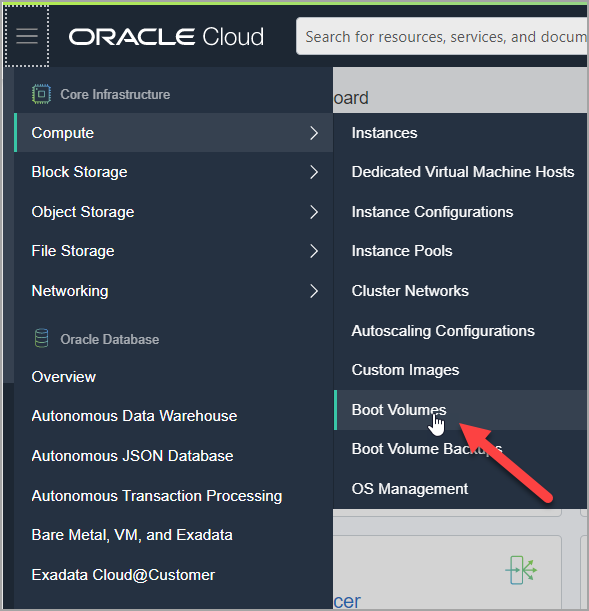
Login to OCI, Open the navigation menu. Under Core Infrastructure, go to Compute and click Boot Volumes.
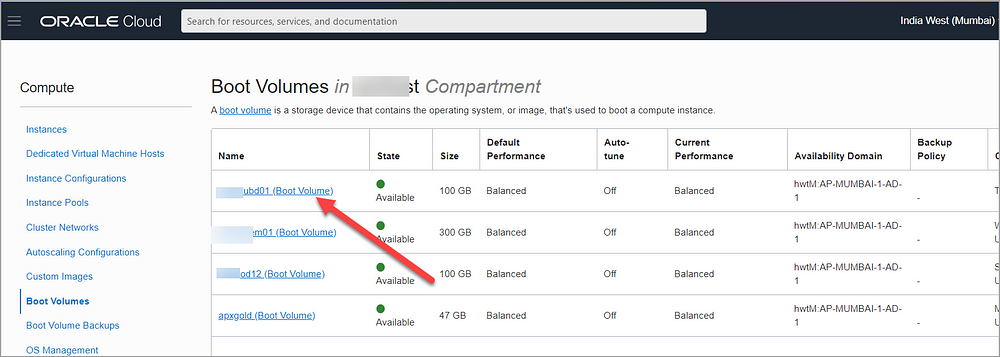
In the Boot Volumes list, click the boot volume you want to resize.
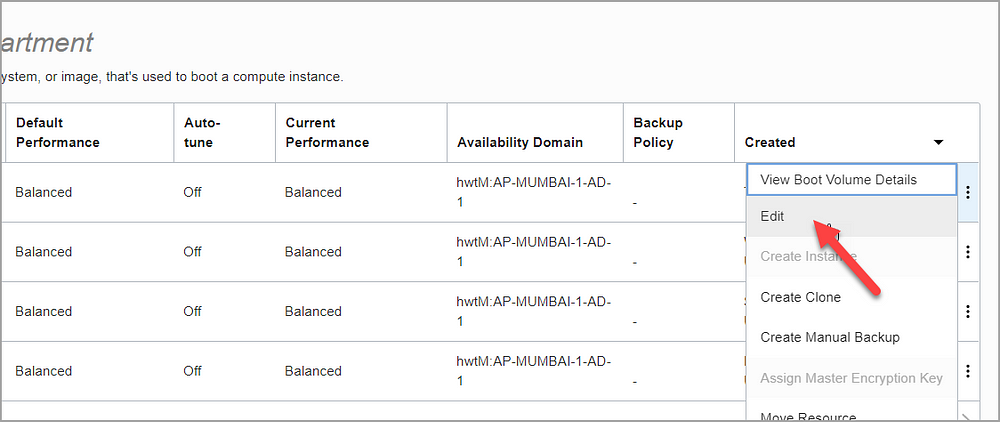
Then choose three dots and click Edit

Specify the new size in VOLUME SIZE (IN GB). You must specify a larger value than the boot volume’s current size (for e.g. 100GB)
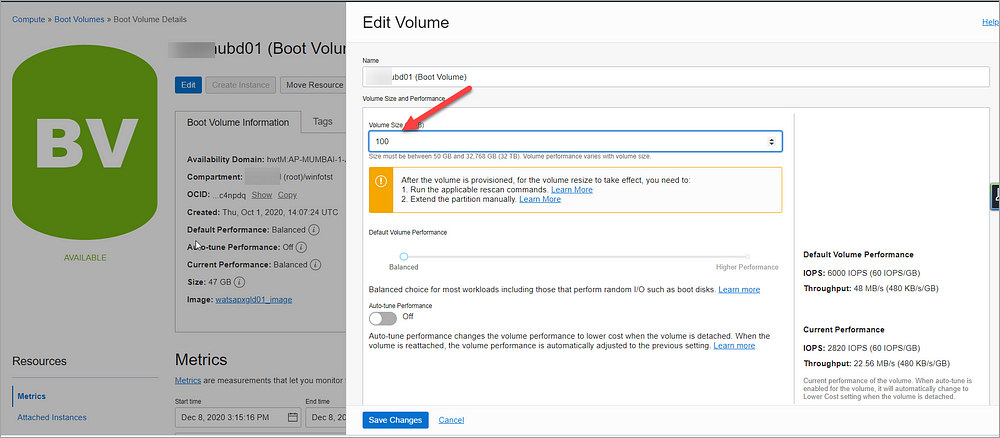
Click Save Changes. This opens a dialog that lists the commands to rescan the disk that you need to run after the volume is provisioned.

You need to run these commands so that the operating system identifies the expanded volume size.
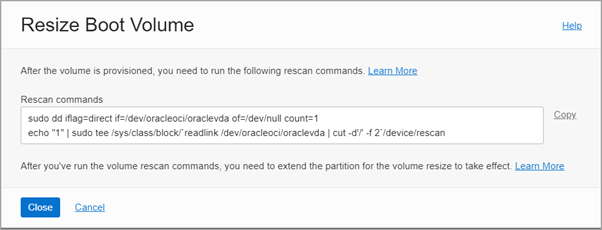
Now the resize of boot volume is completed successfully in OCI. We need to now proceed with steps to be performed Linux box.

Login to Linux VM as root user and run the OCI commands from above step.

# sudo dd iflag=direct if=/dev/oracleoci/oraclevda of=/dev/null count=1
# echo “1” | sudo tee /sys/class/block/`readlink /dev/oracleoci/oraclevda | cut -d’/’ -f 2`/device/rescan
Now the next step is to run the OCI utility oci-growfs command which will resize the / disk.

oci-growfs is available as part of oci-utils rpm for Oracle Linux 7& 8. If the compute is installed from OCI standard image this will be available by default. If the image custom, we need to install oci-utils rpm manually.

Extend the partition and grow the file system using the oci-growfs as below

# /usr/libexec/oci-growfs
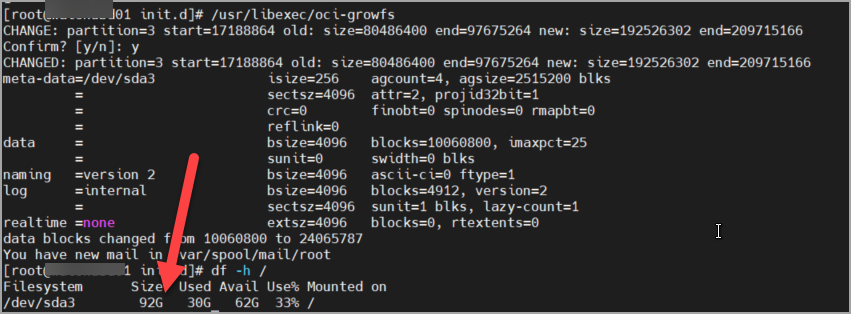
Yoo! Boot disk resize is completed successfully.

Note: This action plan tested and works for Oracle Linux 7.

Useful LDAP Commands

 Below are the frequently used ldap commands that will be handful for DBA who is supporting OID.


OID Default LDAP port - 3060

AD Default LDAP port - 389

Query Attrributes for User from AD

ldapsearch -h <AD LDAP Server> -p <LDAP Port> -D "<LDAP User>" -w "<Password>" -W  "dc=domain,dc=com" "sAMAccountName=<Namee>"

Query Attrributes for User from OID

ldapsearch -h <OID LDAP Server> -p <LDAP Port> -D "<LDAP User>" -w "<Password>" -W  "dc=domain,dc=com" "uid=<Namee>"

LDAP Query to list groups assigned to User in OID

$ORACLE_HOME/bin/ldapsearch -h <OID/LDAP Server> -p <LDAP Port> -D "cn=orcladmin" -w "<password>" -b  "dc=domain,dc=com" -s sub "(uniquemember=cn=muthadi\, venkat,cn=users,dc=domain,dc=com)" dn


ADD GROUP TO USER FROM BACKEND in OID
Create LDIF file with attributes as below:
test.ldif
dn: cn=Administrator,cn=groups,dc=domain,dc=com
changetype: modify
add: uniquemember 
uniquemember : cn=muthadi\, venkat,cn=users,dc=domain,dc=com

Then Run below command
ldapmodify  -h <OID/LDAP Server> -p <LDAP Port> -D "cn=orcladmin" -w <password> -v -f test.ldif  

List All Groups in OID
./ldapsearch -x -h <OID/LDAP Server> -p <LDAP Port> -D cn=orcladmin -w <password> -L -b "cn=groups,dc=domain,dc=com" -s one "objectclass=*" dn


I use these regularly in my day to day activities, please feel free to correct or add any things that will be useful for others.


Thursday, July 6, 2017

/OA_HTML/AppsLocalLogin.jsp was not found in EBS 12.2


Issue:


Recently we performed clone of EBS 12.2 and post clone when we tried to launch our DMZ application we started seeing below error.

Not Found

The requested URL /OA_HTML/AppsLocalLogin.jsp was not found.

The primary node works without error. The issue is only with DMZ/Secondary node which has been added as part of the clone.

Fixes tried:
Tried to run "Generate Producte JAR Files" with force options.

Ran oJsp compilation as below

$ perl ojspCompile.pl --compile --flush -p 10 -log /tmp/ojspc_error.log

None of these helped.

Fix

Then later I realized that OA_HTML in EBS 12.2 is linked to oacore_server managed server via interface file mod_wl_ohs.conf.  Apache uses this file to identify where the application is residing at then get the information.

With this information, I verified the file mod_wl_ohs.conf in /config/OHS/ and noticed that it has entries as below

$ cat /u01/EBSDB/fs1/FMW_Home/webtier/instances/EBS_web_EBSDB_OHS2/config/OHS/EBS_web_EBSD/mod_wl_ohs.conf
LoadModule weblogic_module   "${ORACLE_HOME}/ohs/modules/mod_wl_ohs.so"
        DynamicServerList OFF
        
                SetHandler weblogic-handler
                WLCookieName JsessionIDEkanban
                WebLogicCluster ebsapp.local:6847
                WLTempDir ${ORACLE_INSTANCE}/tmp
       
       
                SetHandler weblogic-handler
                WebLogicCluster ebsapp.local:6847
                WLTempDir ${ORACLE_INSTANCE}/tmp
       
       
                SetHandler weblogic-handler
                WLCookieName JsessionIDYMS
                WebLogicCluster ebsapp.local:6847
                WLTempDir ${ORACLE_INSTANCE}/tmp
       

This file is missing key entries for OA_HTML. forms, etc., and thus apache is unable to redirect to actual EBS Login page. 

With this details, I added the information that is missing as below and then bounced apache services.

LoadModule weblogic_module   "${ORACLE_HOME}/ohs/modules/mod_wl_ohs.so"
        DynamicServerList OFF
        OA_HTML
>
                SetHandler weblogic-handler
                WebLogicCluster ebsapp.local:7247
                WLTempDir ${ORACLE_INSTANCE}/tmp
       
        forms
>
                SetHandler weblogic-handler
                WLCookieName JsessionIDForms
                WebLogicCluster ebsapp.local::7447
                WLTempDir ${ORACLE_INSTANCE}/tmp
       
        webservices
>
                SetHandler weblogic-handler
                WLCookieName JsessionIDOAFM
                WebLogicCluster hpebsdev20.hpinc.com:7647
                WLTempDir ${ORACLE_INSTANCE}/tmp
       
        formsclient
>
                SetHandler weblogic-handler
                WLCookieName JsessionIDFORMS-C4WS
                WebLogicCluster ebsapp.local::7847
                WLTempDir ${ORACLE_INSTANCE}/tmp
       
       
                SetHandler weblogic-handler
                WLCookieName JsessionIDEkanban
                WebLogicCluster hpebsdev20.hpinc.com:6847
                WLTempDir ${ORACLE_INSTANCE}/tmp
       
       
                SetHandler weblogic-handler
                WebLogicCluster ebsapp.local:6847
                WLTempDir ${ORACLE_INSTANCE}/tmp
       
       
                SetHandler weblogic-handler
                WLCookieName JsessionIDYMS
                WebLogicCluster ebsapp.local:6847
                WLTempDir ${ORACLE_INSTANCE}/tmp
       

Thank you.