FRM-92101 - Unable to Launch EBS & Discoverer in Same Browsers
Issue :
Getting error frm-92101: There was a failure in the Forms Server during startup. This could happen due to invalid configuration.
Unable to launch EBS and Discoverer plus applications together from Internet Explorer. This issue is occurring only if both Discoverer and EBS services are running on same server.
Issue occurs when we launch them together as below
- Launch EBS URL and launch any forms
- Then now open a new tab and launch discoverer URL
- Then EBS Forms fail with below error message.
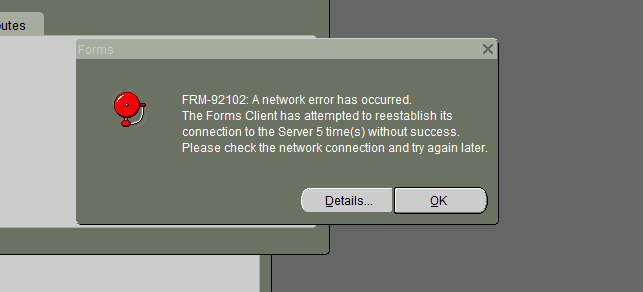
And we can see below error messages in java console
oracle.forms.net.ConnectionException: 500
at oracle.forms.net.ConnectionException.createConnectionException(Unknown Source)
acache: Read manifest for https://ebs.domain.com:4443/OA_JAVA/oracle/apps/fnd/jar/fndewt.jar: read=45 full=87491
java.io.EOFException
at java.io.DataInputStream.readUnsignedByte(Unknown Source)
- Then later when we close and retry to launch forms it still fails with frm-92101 message as below
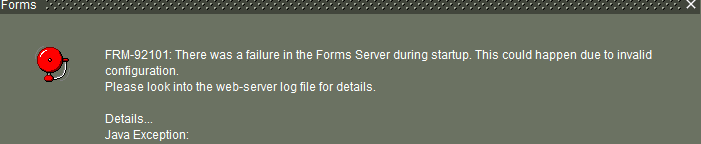
- Below is the error recorded in application.log file
Unable to switch to Working Directory: /u01/oravis /apps/tech_st/10.1.3/forms
14/08/28 18:37:22.839 formsweb: Forms session <5> failed during startup: no response from runtime process
Cause
This issue is occurring because of improper handling path variable when a discoverer is launched. When EBS application is launched it sets JSESSIONID cookie with a restriction of path= /OA_HTML so that this is restricted to EBS Applications. But when the discoverer application is launched it is setting JSESSIONID without any restriction.
This makes that the DISCOVERER JSESSIONID cooke is also passed with request send to EBS server and since DISCOVERER lacks the "path=/discoverer" when setting the cookie the HTTP requests for Forms Servlet receive an 'unexpected' JSESSIONID cookie value and fail with the error.
EBS http:
Set-Cookie: JSESSIONID=3c3046608609362f0bfe2e0ffc36096ef65ada33c71207aac7f9a4cc881ea06a.e3qPc3mMa34Ne34TahyLa3iKaN50; path=/OA_HTML; secure
Discoverer http:
Set-Cookie: JSESSIONID=hHq6TnsdMJhJlQvTk4nRTjSh2x00BKphgT6ktw376Xx1V30L1DfX!1397667650; domain=.domain.com; path=/; secure; HttpOnly
Solution:
There are two workarounds to prevent this issue
Workaround 1:
This workaround fixes issue of launching both forms and discoverer together but this restricts users launching more than one forms for their activity
- In the $CONTEXT_FILE change
<forms_tracking_cookies oa_var="s_forms_tracking_cookies">disabled</forms_tracking_cookies>
to
<forms_tracking_cookies oa_var="s_forms_tracking_cookies">enabled</forms_tracking_cookies> - Run autoconfig to reflect changes and bounce application services.
(or)
- If autoconfig execution cannot be performed rightway, update orion-web.xml file under $INST_TOP/ora/10.1.3/j2ee/forms/application-deployments/forms/formsweb
<session-tracking cookies="disabled" />
to
<session-tracking cookies="enabled" />
- Bounce opmn services using adopmnctl.sh
Workaround 2:
This workaround is most suggestable than prior and this is performed on Discoverer side and this changes make the discoverer to restrict usage of its JSessionid cookie.
- Need to add following entries to weblogic.xml file of discoverer.war file.
<session-descriptor>
<cookie-name>JSESSIONID</cookie-name>
<cookie-path>/discoverer</cookie-path>
</session-descriptor>
<cookie-name>JSESSIONID</cookie-name>
<cookie-path>/discoverer</cookie-path>
</session-descriptor>
- The below are the files that needs to be modified with above changes. The paths may not be exact but should be similar as below
$DOMAIN_HOME/servers/<DomainName>/tmp/_WL_user/oracle.discoverer/yn4f2j/WEB-INF/weblogic.xml
$DOMAIN_HOME /servers/<DomainName>/tmp/_WL_user/discoverer_11.1.1.2.0/51oeh7/war/WEB-INF/weblogic.xml
$DOMAIN_HOME /servers/<DomainName>/tmp/_WL_user/discoverer_11.1.1.2.0/51oeh7/war/WEB-INF/weblogic.xml
- Once the changes are done reploy discoverer.ear using fusion middleware console
- Login FMW Console, click on “Lock & Edit” and go to Deployments -> Select Discoverer (11.1.1.X.0) -> Click on Update -> Select “Redeploy this application using the following deployment files” -> Next -> Finish -> “Activate Changes”
- Bounce opmnctl services
Now you should be able to launch both EBS and discoverer without any restrictions
